 No code
Founders and indie makers
Ship the landing page you love, tonight.
- Exact prompt
- Open in Lovable

Screenshot or video → any AI builder
Recast turns any screenshot or video into the exact prompt your AI builder needs, then checks that what it built matches.
25 free credits every month · No card needed
Works with the AI builders you already use
The problem
Paste a screenshot into v0, Lovable, or Bolt and it improvises the fonts, colors, and spacing. Then you spend credits and hours correcting it.
You don’t know the font, the hex codes, or what that effect is called. So you ask for “something like this” and hope.
Recast names every style for you.
“Make it look like this, but… cleaner?”
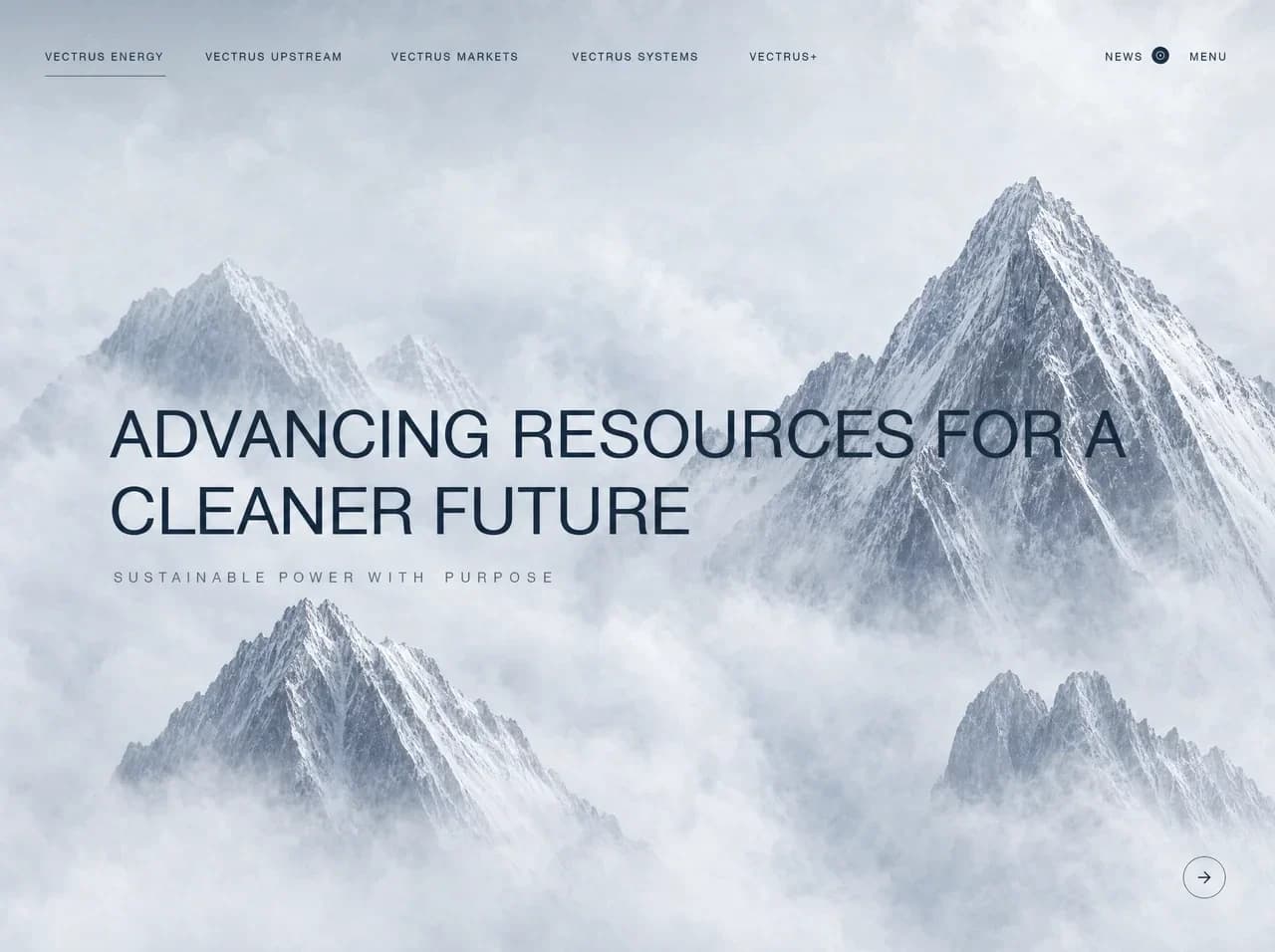
Advancing resources for a
cleaner future
Sustainable power with purpose
→With only a picture to go on, it improvises the weights, spacing, and colors. Every correction is another round of credits.
Recast writes the exact prompt.
“Closer. The spacing is still off, and the colors?”
Advancing resources for a
cleaner future
Sustainable power with purpose
→Close-but-wrong is hard to spot by eye, and harder to explain to a client. So you ship it, or you keep paying.
Recast scores the build against the original.
“Is this… right? It looks close.”
Advancing resources for a
cleaner future
Sustainable power with purpose
→Who it’s for
You don’t need design vocabulary to start. There’s enough detail for a senior engineer to build to spec.
No codeShip the landing page you love, tonight.
 Low code
Your design, built faithfully. Motion included.
 Pro code
Real tokens for Claude Code and Cursor, not “a warm blue”.
 Any level
Client reference to first build, with proof it matches.
Recast reads the pixels, so you never have to guess what a style is called. Every prompt names it all:
Grids, gaps, max widths, and how it all stacks on mobile.
Every word, quoted exactly as it appears.

A named color token list, not “some warm blue”.
The closest Google Font, with sizes, weights, and tracking.
Buttons, cards, navs, and inputs, described part by part.

Hover, focus, and animation, with timing and easing.
How it works
✓ energy-hero.png01
A screenshot, a hero video, or a screen recording.
Layout: full-bleed peaks, nav on top, headline at 42%
Type: uppercase sans, 400, 72px, tracking -0.005em
Color: ink #14233A on mist #EEF2F6
Nav: 5 caps links, 12px, 0.12em; active underline
CTA: 44px circle, 1px ink border, arrow
02
Every style named. Ask for changes in plain words; each version is saved.
03
Opens Lovable with the prompt filled in, or copy it into any builder.
04
Paste the live link. Get a match score and a fix prompt for what’s off.
# Design spec: Vectrus hero
## Colors
--color-ink #14233A
--color-mist #EEF2F6
## Type
display 72px / 1.08 · 400
05
DESIGN.md, a Tailwind theme, and tokens your coding agent builds to.

Hero loops, feature animations, screen recordings. Recast samples the frames and writes the motion into the prompt: what moves, when, how fast, and how to build it.
1 · Your video
2 · Frames Recast reads
 0.4s
0.4s 1.3s
1.3s 2.4s
2.4s 3.3s
3.3s 4.4s
4.4s 5.7s
5.7sSampled in your browser. The video never uploads.
3 · Motion, written out
## Motion and timeline
Check your build
Paste the link your builder gave you. Recast opens it at your design’s size, compares it with the original, and gives you a match score and a fix prompt for whatever’s off.
Advancing resources for a
cleaner future
Sustainable power with purpose
→Match score
3 to fix
For coding agents
Every prompt version exports as a DESIGN.md your agent builds to, a Tailwind v4 theme, CSS variables, and tokens.json. Real values, in one place. Free.
For Claude Code, Cursor and other coding agents. Keep it in your repo.DESIGN.md
## Colors| Token | Value | Use ||---|---|---|| `--color-ink` | #14233A | Headline, nav text, button stroke || `--color-slate` | #5B6676 | Tagline, secondary text || `--color-stone` | #8E9BAE | Mountain shadows, dividers || `--color-mist` | #EEF2F6 | Sky and page background |## Fonts| Role | Family | Weights ||---|---|---|| Sans | Inter (Helvetica Neue, Arial, sans-serif) | 400, 500 |
Pasting a screenshot into your builder feels faster. Here’s where the time actually goes.
Rounds of fixes
Tokens and time spent
Type: Inter 900, 72px, tracking -0.035em
Color: #0F0E47 on #FFFFFF, accent #3F3DC4
Spacing: 24px grid, 120px section padding
Button: pill, 48px, lifts 1px on hover
Rounds of fixes
Tokens and time spent
Rounds and meters are illustrative; accuracy is from our benchmark on real designs.
91%
accuracy in Precise mode, measured on real designs
~48s
for a full prompt, streamed as it’s written
0
videos uploaded: only frames leave your device
Any
AI builder that takes a text prompt
Every plan includes build checks from a link or a screenshot, and free spec export.
Recast turns any screenshot, hero video, or screen recording into the exact prompt to rebuild it in an AI builder. It names what it sees (layout and spacing, every piece of copy, hex colors, fonts and sizes, components, and motion), so your builder doesn't have to guess. Then it checks your build against the original, and exports the design spec for your coding agent.
With only an image, the builder has to guess what each style is called, so fonts, spacing, and colors drift, and every round of fixes costs tokens and time. Recast writes the styles down precisely first. In Precise mode it's 91% accurate on real designs.
A Markdown prompt your builder can follow: the layout, every piece of copy, hex colors, fonts, spacing, components, and how things behave. Copy it, or open it straight in your builder.
No. That's the point: you drop the visual and Recast names every style for you. When you want a change, say it in plain words, like “make the card 3D”.
Yes. Paste the link your builder gave you, or upload a screenshot. Recast opens it at your design's size, compares it with the original, and gives you a match score out of 100 plus a fix prompt for anything that's off. A check uses the same credits as a prompt in the mode you pick.
It's a spec file you keep in your repo. Claude Code, Cursor, and other coding agents read it and build to the exact colors, fonts, and spacing instead of guessing. Recast exports it free with every prompt version, along with a Tailwind v4 theme, CSS variables, and tokens.json.
Any builder that takes a text prompt: v0, Lovable, Bolt, Claude Code, Cursor, Replit, and more.
Yes, on Studio. Hero loops, feature animations, and screen recordings up to 60 seconds. Your browser samples the frames, so the video itself never leaves your device.
An image prompt is 5 credits in Precise or 2 in Fast; a video prompt is 12 or 5. Free gives you 25 credits every month.